The four-channel mixer that quietly became the booth you walk into. Here’s what the DJM-A9 actually changes over the 900NXS2 — and whether it’s worth $2,699 of your own money.
The short version
The DJM-A9 is the best four-channel club mixer Pioneer DJ has made, and in 2026 it’s the unit you’re most likely to find waiting for you in a professional booth. Cleaner 32-bit sound, a genuinely useful microphone section, and the connectivity to run two laptops and a Bluetooth feed at once make it a real step on from the DJM-900NXS2 rather than a paint job.
It also plays it safe. The layout you already know is the layout you get, the remote-management features need an external router you’ll have to supply, and at $2,699 it’s a serious outlay. For a working club or resident DJ, that’s money well spent. For everyone else, the honest answer is more nuanced — and that’s what the rest of this review is about.
What the DJM-A9 actually is
The DJM-A9 is Pioneer DJ’s flagship four-channel club mixer and the official successor to the long-serving DJM-900NXS2 — the unit that sat in pretty much every serious booth for the better part of a decade. Pioneer DJ now operates under the parent brand AlphaTheta, but the product is still sold and supported as Pioneer DJ, and the design language hasn’t moved: if you’ve stood in front of a 900NXS2, you already know where everything is.
That’s deliberate. A club-standard mixer’s first job is to be familiar under pressure, in the dark, on someone else’s gear. The A9’s improvements sit around that familiar layout rather than rearranging it — better converters, a smarter microphone section, more connectivity, and three new effects. Taken individually none of them is dramatic. Together they’re the reason the A9 has become the default install in new and refitted clubs.
Sound: the part that matters most
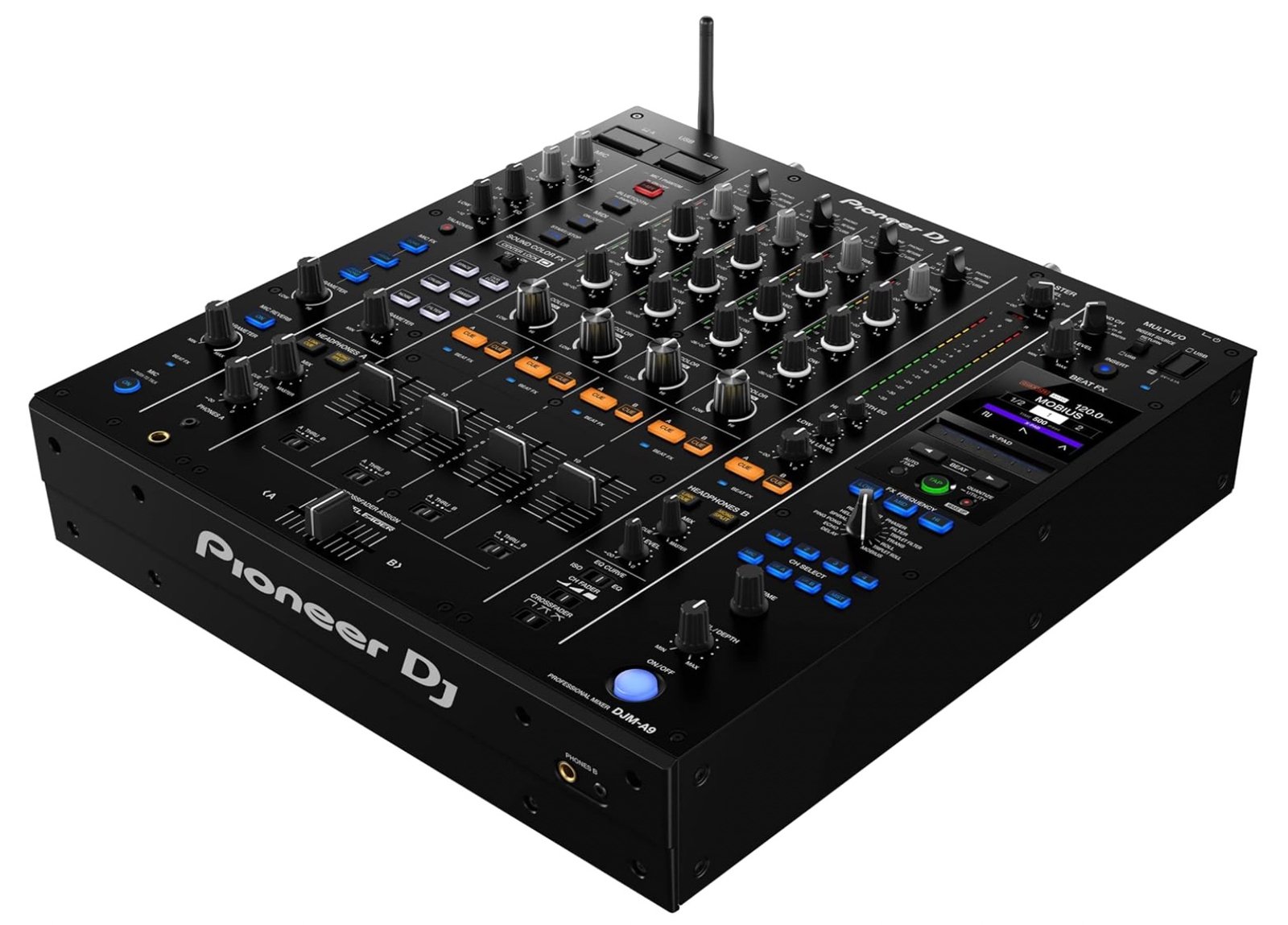
The headline upgrade is the converter section. The channel inputs use a 32-bit ESS Technology A/D converter, and the master and booth outputs use 32-bit D/A converters from the same supplier. In plain terms: the signal coming in and the signal going out to the speakers and the booth monitors are cleaner and more detailed than the 900NXS2 managed, with more headroom before things start to sound hard.
Does it make your records sound “better”? Not in a way that turns a bad track good. What it does is preserve more of what’s already there — the low end stays defined when the system is loud, and the booth monitor signal more closely matches what the crowd is hearing, which makes long blends easier to judge. On a proper club rig, that difference is audible. On bedroom monitors, far less so, and that’s worth being honest about before you spend the money.
Effects and the new Center Lock
The A9 keeps the six Sound Color FX and expands the Beat FX count to 14, adding three new ones over the 900NXS2: Mobius (an oscillator that rises or falls with the beat), Triplet Filter, and Triplet Roll. The triplet pair in particular open up rhythmic patterns the old box couldn’t do without external gear.
The genuinely clever addition is Center Lock. Turn it on and each Sound Color FX knob clicks to a stop at the centre (neutral) position, so you can slam a filter back to zero without overshooting mid-mix. It’s a small feature that solves a real, sweaty-handed problem. If you prefer the old free-turning feel, you switch it off and the knobs behave exactly like the 900NXS2 did.
The microphone section is the quiet win
This is where the A9 does something no DJ mixer had done before: one of its mic inputs offers +48V phantom power, so you can plug a high-quality condenser microphone straight into the mixer. For mobile and event DJs who MC or run announcements, that removes a whole box from the setup.
There are also three dedicated mic effects — Echo, Pitch and Megaphone — plus a separate reverb, and a Push To Talk button to drop the music and grab the mic cleanly. Usefully, the mic signal can be excluded from the recording output, so you can hype the room live but keep your recorded mix vocal-free. If you’ve ever ruined a good recording by talking over it, you’ll appreciate that one.
Connectivity: built for changeovers and B2B
The A9 is generous with I/O in ways that matter for real gigs. There are two USB-B and two USB-C ports, letting two computers running rekordbox or Serato DJ Pro stay connected at once — so the changeover between DJs, or a back-to-back set, happens without anyone unplugging anything. A Bluetooth input can be routed to any channel and treated like a normal source, effects and all, which is handy for quick requests or a phone source in a hurry.
Round the back you get the expected pro outputs: dual XLR master, RCA master, a separate RCA recording output, and two 1/4″ booth outputs with a 2-band booth EQ. Two headphone outputs — each with its own cue, volume and mix-balance controls — mean two DJs can monitor independently during a B2B. The A9 is compatible with rekordbox and Serato DJ Pro including their DVS components (software licences sold separately).
About Stagehand & the router
The A9 has built-in Wi-Fi for Stagehand, AlphaTheta’s front-of-house remote-management app — a front-of-house engineer can monitor levels and tweak settings from an iPad without entering the booth. The catch: it needs a separate LAN router you supply, and Stagehand currently works with the DJM-A9 and CDJ-3000 family. It’s a real feature for installed club systems; for a solo touring DJ it’s mostly irrelevant, and the lack of a built-in router is the one place the A9 feels like it left something on the table.
Specifications
| Spec | Detail |
|---|---|
| Channels | 4 |
| A/D converter | 32-bit, ESS Technology (channel input) |
| D/A converter | 32-bit, ESS Technology (master & booth) |
| Sound Color FX | 6 |
| Beat FX | 14 (incl. new Mobius, Triplet Filter, Triplet Roll) |
| Crossfader | 3rd-generation MAGVEL FADER |
| Microphone | 2 inputs, +48V phantom power, 3 mic FX + reverb, Push To Talk |
| USB | 2× USB-B, 2× USB-C (dual-computer) |
| Wireless | Bluetooth input (routable) · Wi-Fi for Stagehand |
| Outputs | 2× XLR master, RCA master, RCA rec, 2× 1/4″ booth |
| Booth EQ | 2-band |
| Headphone outputs | 2 (independent cue / volume / balance) |
| Software | rekordbox, Serato DJ Pro (+ DVS) — licence sold separately |
| Price | Around $2,699 USD (street); MSRP runs higher at some retailers |
Pricing sits around $2,699 at competitive dealers, with list prices closer to $2,800–$2,900 in places. It’s a premium, club-tier outlay — budget for the software licence on top if you don’t already own it.
Pros & cons
What we liked
- Cleaner, higher-headroom 32-bit sound vs the 900NXS2
- Phantom-powered mic input — a first on a DJ mixer
- Dual-computer USB makes changeovers and B2B seamless
- Center Lock fixes a real mid-mix knob problem
- Familiar club-standard layout — no relearning
- Dual independent headphone outs for back-to-back sets
What we didn’t
- Stagehand needs a separate router you have to supply
- Iterative, not revolutionary — plays it safe
- $2,699 is a serious outlay for non-pro use
- Sound gains are far clearer on a club rig than at home
- Software licence and a decent flight case are extra costs
Who should buy the DJM-A9?
Buy it if you’re a working club or resident DJ, you’re outfitting a venue, or you want the exact mixer you’ll meet in professional booths so your muscle memory transfers everywhere. For that person the A9 is an easy recommendation and the obvious 900NXS2 replacement.
Think twice if you mostly play at home or smaller gigs. A 900NXS2 (new or used) gets you most of the way for less, and a two- or three-channel mixer like the DJM-750MK2 covers a lot of working setups at a fraction of the price. The A9’s gains are real, but you pay club money for them.
Keep reading
Some links in this review are affiliate links. If you buy through them we may earn a small commission at no extra cost to you — it helps fund the site. We only recommend gear we’d use ourselves. Prices are correct at the time of writing and change often; check the current price before buying. Questions? dan@