We’ve highlighted 5 key techniques for mastering a DJ mix in Ableton.
Mastering a DJ mix in Ableton correctly makes it sound loud and polished so it stands up to the many DJ mixes online. Follow these fundamental steps so you don’t ruin your hard work.
Before we move into mastering the DJ mix, we need to make sure we’re completely happy with it. Mastering brings the finishing touches to the overall sound but won’t hide any fundamental issues with your mixtape.
New to this and want the full walkthrough first? Start with our complete guide on how to make a DJ mix in Ableton Live, then come back here to master it.
1. Critical listening
Put enough time aside to sit and listen through the entire mix uninterrupted. This lets you get a feel for the pace and flow of the mix as a whole, and errors become much easier to spot.
Listen out for the flow of the mix and make sure it follows the trajectory that suits your style. You may want your DJ mix to peak halfway, or it may follow a pattern of smaller, more regular peaks and troughs.
It’s also important to listen out for the spacing of the transitions. A 3-minute track followed by a 7-minute extended remix could sound a bit odd. Again, this depends on your own style.
For tips on programming a DJ mix with Ableton, check out our full guide: How to make a DJ mix in Ableton.
Prepare your Arrangement View in Live
We’re not counting this as one of our tips because it’s quite obvious. However, streamlining your workflow is crucial for productivity and makes things visually simple when you get round to mastering a DJ mix in Ableton.
Once you’re happy with your final version, you need to gain as much screen space as possible for the volume balance process.
Reduce the left-hand menu by hitting the triangle next to the search bar, and drag the clip selector window downward to minimise it. Your arrange screen should now be clean and focused on the tracks themselves.
2. Setting Ableton’s Compressor
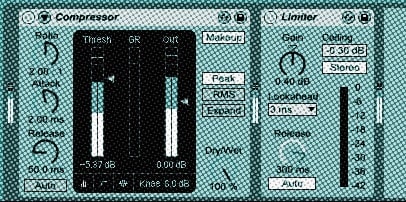
Drag Ableton’s Compressor and Limiter onto the master channel. Make sure the compressor is the first audio effect in the chain.
These effects add an element of control over our mix. However, all of the music you’ve used will have been mastered already in the studio, so we’re not going to over-apply them.
On the compressor, we need to see a tiny flick on the GR (gain reduction) meter when our tracks are playing. Adjust the “Thresh” level to achieve this — less is more.
3. Setting Ableton’s Limiter
The limiter adds control over the main volume coming out of your master channel and is arguably the most important effect when you master a DJ mix in Ableton. It won’t compensate for uneven volume levels between individual tracks, though — that’s the next step.
Use the parameters that load with the standard unit and adjust the gain so there’s a tiny flick on the main meter. Remember, less is more!
Overuse of your audio effects is the number 1 reason for DJ mixes sounding muddy and squashed. Mastering a DJ mix well is about understanding your effects and using them sparingly.
4. Balancing volume levels of your DJ mix (outside-in method)
Balancing the volume levels of each track is even more important than the mastering process and needs to be done methodically. The aim is to get all tracks as loud as possible so your mix stands up with others — but each track must sit at the same volume as the rest, while avoiding distortion.
Play through each track and make sure none are pushing your channel volume into the red, while getting as much volume out of them as possible. Use the volume bar to adjust. If you’ve automated the track volume, adjust it by highlighting the track in the arrange view and dragging the automation up and down.
We use the “outside-in” technique. With all tracks at their maximum (unclipped) level, find the quietest track and match the first track in the mix to it. Then play your first track and your last track and match their levels. Then your second and second-from-last, and so on, until you arrive in the middle. If they’re not even, work back out using the reverse process. Repeat until all levels are the same.
5. Bouncing down
At this point you’ve completed the necessary steps to master a DJ mix in Ableton.
Remember to “Collect All and Save” from the “File” menu to create a folder that includes your audio and sample information files.
To bounce down (export), select the section you want to export using the locators at the top of the screen, then choose “File” > “Export Audio/Video”. Set your file type (Live gives you MP3 or WAV/AIFF export options), click export, and choose where to save your mix.
We hope this gives you a solid starting point on how to master a DJ mix in Ableton. For a more detailed rundown of mastering and programming a mix, check out our DJ courses.
If you enjoyed this post, head to our guide on how to make a DJ mix in Ableton Live or watch our video below.
FAQs
What is Ableton Live?
Ableton Live is a popular digital audio workstation (DAW) used by musicians, producers, and DJs for creating, editing, and mastering music. It offers a wide range of features and tools designed for live performance, music production, and DJing.
Why should I use Ableton Live to master my DJ mix?
Ableton Live offers a range of tools that make it ideal for mastering a DJ mix — an intuitive interface, built-in effects, and comprehensive audio editing. It’s a popular choice for its versatility and ease of use.
I’m new to Ableton Live. Can I still master a DJ mix?
Absolutely. This guide provides step-by-step instructions for all skill levels, so even beginners can master a DJ mix in Ableton Live with confidence.
What are some key tips for mastering a DJ mix in Ableton Live?
- Organise your tracks and set appropriate levels.
- Apply EQ to balance the mix and create space for each element.
- Use compression to control dynamics and create a consistent mix.
- Add reverb and delay for depth and space.
- Limit the final output to achieve a loud, polished sound.
Do I need any additional plugins to master a DJ mix in Ableton Live?
No. Ableton Live comes with a variety of built-in effects and tools suitable for mastering. You may choose third-party plugins for additional control, but this guide focuses on Ableton’s native features so it’s accessible without extras.
How can I learn more about making and mastering a DJ mix in Ableton Live?
Watch our video walkthrough above, or visit our DJ courses to learn the techniques in more depth. You can also explore Ableton’s official website, online tutorials, and user forums to develop your skills.