Last updated: October 2026
What’s new in Loopcloud 8? Loopcloud 8, released by Loopmasters on 22 October 2026, adds four headline tools to the sample platform: Inspire, which builds a starting arrangement from a chosen genre; Listen, which suggests samples that fit harmonically with a track you’re working on; Advanced Search, which understands plain-English descriptions; and Loopcloud’s first iOS app. It also doubles the Flip preset library to 2,000 and adds five new effects.
Plans start at $10.95 a month, and Loopcloud’s plans page says every tier gets the full platform, so the new features aren’t locked behind the top plan. For DJs, the update matters most if you make your own intros, extended edits or tool tracks in a DAW. If you only play other people’s records, it isn’t aimed at you.
Quick takeaways
- Loopcloud 8 is available now to new and existing subscribers, per Loopmasters’ launch announcement.
- Inspire starts an idea for you: pick a genre and it lays out drums, chords and other parts from the catalogue.
- Listen sits on your DAW master and suggests sounds that fit what’s already playing, including matches from your own imported samples.
- Advanced Search takes descriptions such as “warm analog bassline” and lets you narrow by instrument, genre, mood or artist reference.
- The first Loopcloud iOS app covers Inspire, browsing, previewing and collections; Android is in development.
- Three plans: Artist $10.95, Studio $16.95 and Professional $24.95 a month, differing only in points, storage and machines.
- Annual plans currently get four months free with code 4MONTHSLC8 until 22 November.
What this guide adds: the launch coverage lists features. We’ve mapped them to a DJ’s edit workflow, worked out what each plan costs per download point from the official prices, and set out who should skip the update.
Try Loopcloud 8 free for 14 days
What is Loopcloud 8?
Loopcloud 8 is the latest version of Loopcloud, Loopmasters’ subscription platform for finding, editing and downloading samples, synth presets and MIDI files, which Loopcloud says are licensed to you for life once downloaded. Loopcloud runs as a desktop app with a VST/AU plugin that connects to DAWs such as Ableton Live, FL Studio, Logic and Cubase, and previews follow your project’s tempo and key. The launch announcement puts the catalogue at over 4 million samples, synth presets and MIDI files.
The big shift in version 8 is that search, discovery and the instruments now work with your own sample collection as well as Loopcloud’s catalogue. New to Loopcloud? Our Loopcloud pillar guide explains how the app, plugin and points system fit together.
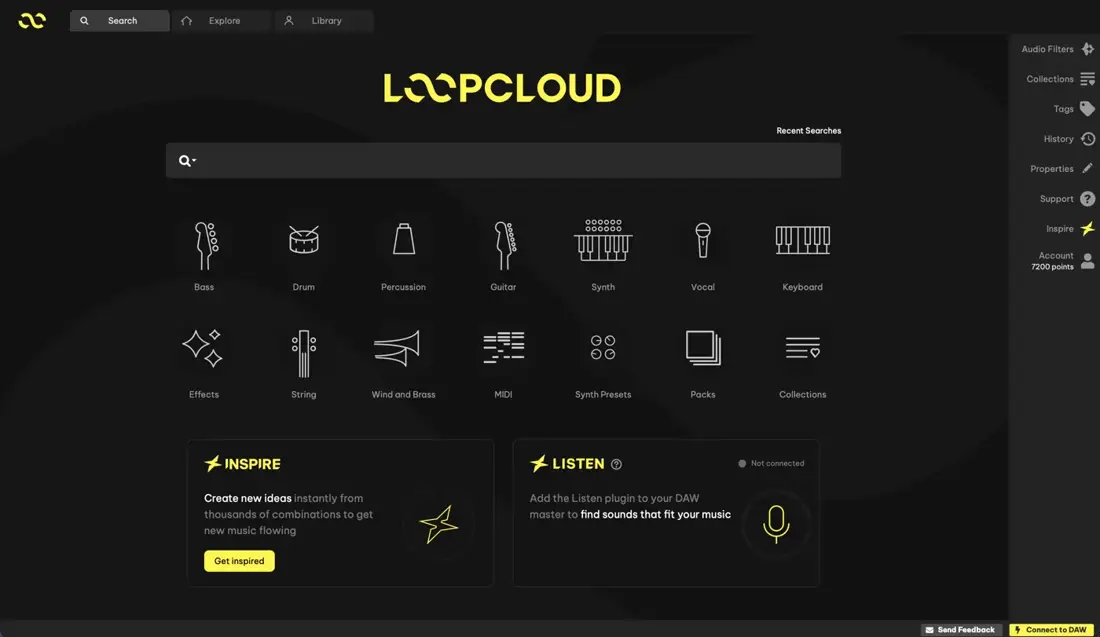
Image: Loopcloud 8 main screen, from Loopmasters’ official launch assets. Inspire and Listen now sit on the home screen.
What are the new features in Loopcloud 8?
Loopcloud 8’s new features fall into three groups: idea generation (Inspire), finding sounds that fit (Listen, Harmonic Matching and Advanced Search), and shaping sounds (Flip, new effects and a wider Editor). Here’s each one, in plain terms.
Inspire: a starting arrangement from a genre
Inspire is a Loopcloud 8 tool that builds a starting arrangement of samples, chords and drums from a genre you choose. In Loopmasters’ launch screenshots, each part sits on its own row (kick, open hi-hat, percussion, keyboard, sub) with lock, solo, mute and refresh controls, so you can keep the parts you like and swap the rest. The decisions after that stay with you.
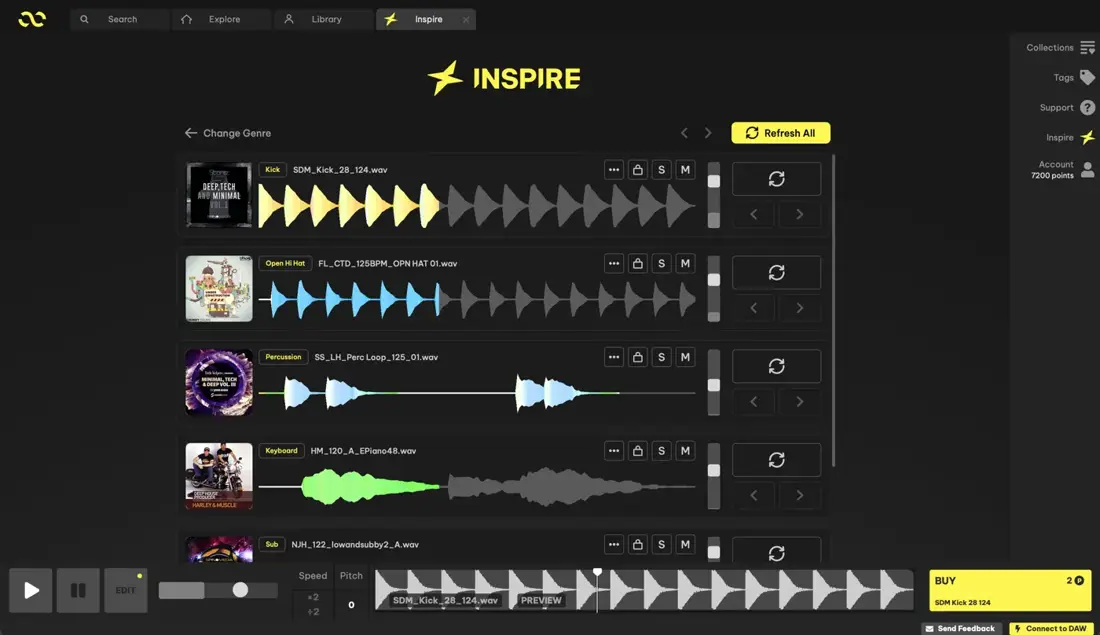
Image: Loopcloud 8 Inspire view, from Loopmasters’ official launch assets.
Listen and Harmonic Matching: sounds that fit your track
Listen is a Loopcloud 8 feature that suggests samples which work harmonically and melodically with a track already in progress. It runs on Loopcloud Intelligence, Loopmasters’ harmonic-matching algorithm, which detects chord changes and where samples sit. The official home screen shows Listen as a plugin you add to your DAW’s master channel.
Harmonic Matching applies the same idea to a single sound: drop in a chord loop or melody and it looks for basslines, leads or one-shots that match, from both the Loopcloud catalogue and your own imported sounds. You can then filter the results by genre or instrument.
Advanced Search: describe the sound in your own words
Advanced Search lets you type a description instead of guessing tags. Loopmasters’ examples are a “warm analog bassline” or synths in the style of a named artist, and you can narrow the results by instrument, genre, mood or artist reference.
Loopcloud Mobile: the first iOS app
Loopcloud Mobile is Loopcloud’s first iOS app. It covers Inspire, catalogue browsing, previewing and building collections, and collections sync to your account so they’re waiting in the desktop app. Android is in development, with no date given.
Flip, effects and the Editor
Flip, the Loopcloud tool that reworks a sound into something new, doubles its preset library to 2,000. Loopcloud 8 also adds five effects (Gator, a step sequencer with swing and randomisation; Looper, for BPM-synced loops; Utility, for gain, pan, width and mono bass; Chorus; and Bitcrush), plus automation curves for changing effects over time. The Editor now works on your whole sample library, not only Loopcloud sounds.
The rest of the update
- MIDI: six new drum kits and new melodic instruments, and MIDI previews now load a matching sound automatically.
- PLAY: the Loopcloud instrument gains the five new effects and direct sample import.
- DRUM: the pattern generator reads instrument and genre tags to suggest patterns that suit the kit.
What does Loopcloud 8 mean for DJs?
For DJs, Loopcloud 8 is most useful as a toolkit for making edits: DJ-friendly intros, extended outros, percussion tools to bridge two tracks, or a drum bed under an acapella. Listen and Harmonic Matching address the slowest part of that job, which is finding a bassline or pad in the right key for the track you’re editing.
The workflow below shows where each new feature fits, from the first idea to a file on your gig USB.
Chart: The DJ Mixtape, from Loopmasters’ Loopcloud 8 launch announcement and official screenshots, October 2026.
Three DJ scenarios where the new tools earn their place:
A club-ready intro for a radio edit
Drop the track’s opening chords into Harmonic Matching and look for a matching bassline or pad, then build 32 bars of drums with Inspire’s kick and hat rows locked in.
A beat under an acapella
Separate the vocal first (our Lalal.ai test covers stem splitting), then run Listen on the DAW master while the vocal plays to find chords that sit with it.
A percussion bridge between genres
Search in plain English for the groove you need, then shape it with Gator or Looper so it locks to the tempo you’re mixing between.
How much does Loopcloud 8 cost?
Loopcloud 8 costs $10.95 a month on the Artist plan, $16.95 on Studio and $24.95 on Professional, according to the official Loopcloud plans page at time of writing. The plans page states that every plan includes the full platform with no feature gates; tiers differ only in monthly points (Loopcloud’s download credits), cloud storage and how many computers you can use.
| Plan | Monthly (USD) | Annual (USD) | Points | Cloud storage | Machines |
|---|---|---|---|---|---|
| Artist | $10.95 | $109.95 | 100/month (1,200/year) | 5 GB | Up to 2 |
| Studio | $16.95 | $169.95 | 300/month (3,600/year) | 50 GB | Up to 3 |
| Professional | $24.95 | $249.95 | 600/month (7,200/year) | 250 GB | Up to 5 |
Prices and allowances from loopcloud.com/cloud/subscriptions/plans, checked October 2026. Annual plans also list 12 free plugins a year.
Every plan includes the SYNC + SOUNDS plugin, the DRUM and PLAY instruments, a 2GB welcome pack and Producertech’s tutorial library (400+ hours), which Loopmasters says is the first time that library has been available outside a Producertech subscription. Partner plugins (up to 12 a year, one a month, from companies including Baby Audio, Tone Empire, Rhodes and Beatsurfing) come with the subscription too. Loopcloud’s homepage says unused points roll over and are frozen if you pause.
Which Loopcloud plan gives the best value per point?
Loopcloud Professional on annual billing is the cheapest per point, at about 3.5 cents, while Artist on monthly billing is the most expensive at about 11 cents. The chart divides each official price by the points it includes.
Chart: The DJ Mixtape, from Loopcloud’s official plans page, October 2026.
Cheaper points only help if you use them. A DJ making a couple of edits a month will rarely need more than Artist’s 100 points, and because points roll over, a quiet month isn’t wasted. Step up to Studio or Professional if you’re producing full tracks, or if you need more than two computers or more than 5 GB of cloud storage.
Is there a Loopcloud 8 deal or free trial?
Yes. Loopcloud offers a 14-day free trial, and the launch announcement says people who have trialled Loopcloud before can take a new one. At time of writing, the plans page also offers four months free on annual plans with the code 4MONTHSLC8, ending 22 November.
Who should skip Loopcloud 8?
Loopcloud 8 is a production tool, so DJs who don’t open a DAW won’t get much from it.
- You only play released tracks. Loopcloud gives you samples to build with, not finished records to mix. For that, look at a record pool or download store instead.
- You don’t use a DAW. The plugin, Listen and drag-and-drop workflow all assume a DAW such as Ableton Live, FL Studio, Logic or Cubase.
- You’re on Android only. The mobile app is iOS for now; Loopmasters says Android is in development.
- You need the sounds for three or more computers on the cheapest plan. Artist covers up to 2 machines; Studio allows 3 and Professional 5.
Still weighing up sample services? Our Loopcloud vs Splice vs Noiiz comparison sets the platforms side by side, and our Loopmasters guide covers the company’s pack store.
Loopcloud 8 FAQ
Is Loopcloud 8 a free update for existing subscribers?
Yes. Loopmasters says Loopcloud 8 is available now to new and existing subscribers, and the plans page states every plan includes the full platform.
Do I need the Professional plan to use Inspire and Listen?
No. According to Loopcloud’s plans page, there are no feature gates: Artist, Studio and Professional differ only in points, storage and the number of computers.
Is the Loopcloud 8 mobile app on Android?
Not yet. Loopcloud Mobile launched on iOS, and Loopmasters says an Android version is in development.
Can I use Loopcloud 8 with my own samples?
Yes. Harmonic Matching searches your imported sounds as well as the catalogue, and the Editor now works on your whole sample library.
Can I get another Loopcloud free trial if I’ve had one before?
Yes. The Loopcloud 8 launch announcement says past trialists can take a new 14-day trial.
Is Loopcloud good for DJs who make their own edits?
It suits DJs who build edits in a DAW. Listen and Harmonic Matching are designed to find parts that fit a track you’re working on, which is the core job when building intros, extended mixes and tool tracks.
Verdict: is Loopcloud 8 worth it for DJs?
- Worth it: DJs who make their own intros, edits, bootlegs or tool tracks in a DAW. Listen and Harmonic Matching target the key-matching legwork.
- Best plan for most DJs: Artist. You get the full feature set, and rolling points cover a few edits a month.
- Step up: Studio or Professional if you produce full tracks, run three or more computers, or want the lowest cost per point.
- Skip: DJs who only mix released music and never open a DAW.
Want the bigger picture on how Loopcloud has changed over time? See what’s new in Loopcloud.
How we research: features, prices and plan allowances were checked against Loopmasters’ Loopcloud 8 launch announcement, loopcloud.com and Loopmasters’ official launch assets in October 2026. Where official sources gave different figures, we left the figure out. Prices can change, so confirm on loopcloud.com before subscribing. Charts are our own, built from the published prices. Screenshots are Loopmasters’ official images. By Dan, DJing since 1994.