Last updated: November 2026
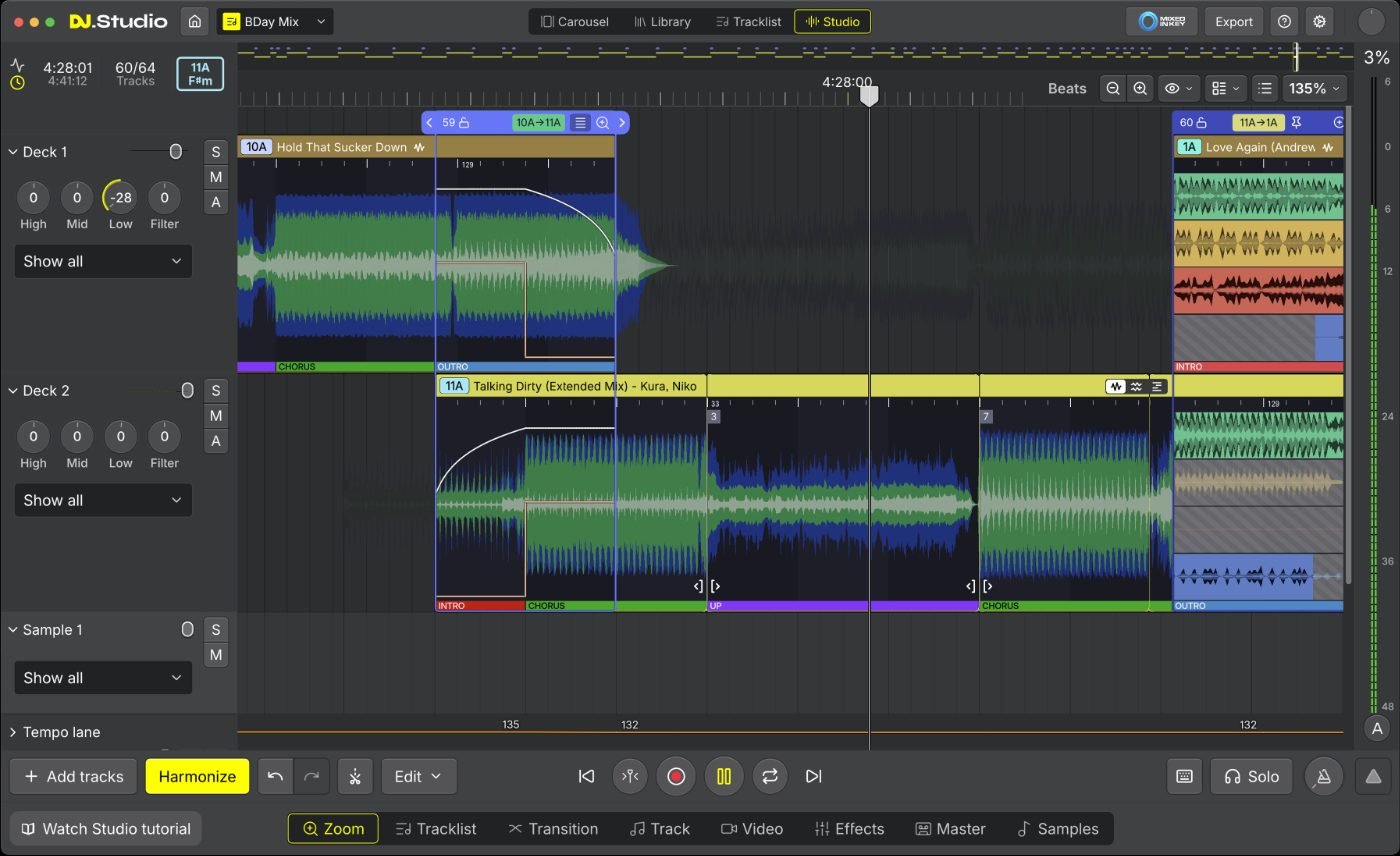
Four pre-recorded client mixes, built in DJ.Studio 5.0
Is DJ.Studio 5 good enough for paid mix work? Yes, for building the mix. I used DJ.Studio 5.0 to build four pre-recorded, 1-hour background mixes for a client’s winter food festival in London. The new phrase detection and Smart Beatgrid did most of the heavy lifting, and the stems held up well inside the mix.
I did the final mix-down and master in Ableton Live, and DJ.Studio’s direct Ableton export made that handover quick. My only real niggle was the playhead running slightly out of time with the audio on close edits. I’ll be using DJ.Studio for the build stage of every mix from now on.
Quick takeaways
- Real job: four pre-recorded, 1-hour background mixes for a paying client, built in DJ.Studio 5.0 and finished in Ableton Live.
- Phrase detection, new in 5.0, labels each track’s sections and starts transitions on a phrase. It was the biggest time-saver on the job.
- Smart Beatgrid kept tracks locked in time, including where the tempo drifts.
- One niggle: the playhead can run slightly out of time with the audio on close edits.
- Stems sound good inside a mix, with a little bleed if you solo them.
- Exporting straight to an Ableton Live project made finishing the master quick.
- One-time licences run from $99 to $209, or $29 a month for Pro + Stems.
DJ.Studio sent me an early release of 5.0, and instead of trying it on a demo project I put it straight to work on a paid job with a deadline. I’ve built pre-recorded mixes in Ableton for years, and I’ve compared the two apps before in DJ.Studio vs Ableton Live, so this is an Ableton user making the switch. For the full list of what changed in 5.0, see DJ.Studio 5.0: what’s new.
What was the job?
The brief was four pre-recorded, 1-hour background mixes for a winter food festival in London. These were finished files played over the venue system, not a live set: DJ.Studio is for building mixes in advance. The client wanted something with an edge that still felt Christmassy, playing under people eating and talking rather than in front of a dancefloor. That means long, smooth blends, steady energy and no awkward key clashes, across four hours of music.
The brief · 4 × 60-minute mixes · food festival background music · London · “edgy but Christmassy” · built in DJ.Studio 5.0 · mixed down and mastered in Ableton Live
Background mixes are a good test for DJ.Studio. Nobody is watching the DJ, so the job is all preparation: track order, clean transitions and consistent levels. That’s the part of the work DJ.Studio is built for.
02 · SWITCHINGHow hard is it to switch from Ableton?
The biggest hurdle switching from Ableton to DJ.Studio is the editing workflow, not any single feature. DJ.Studio is a timeline built around tracks and transitions, so audio editing works differently from Ableton’s arrangement view, where you warp and cut clips yourself. It takes a session or two to adjust.
Once I’d got my head around it, I was working faster than I would in Ableton. DJ.Studio splits the mix into chunks of tracks matched by key and tempo, and you can flick between them on screen easily. In Ableton, that matching and sequencing is a manual job before you touch a single transition.
03 · PHRASESDoes phrase detection actually help?
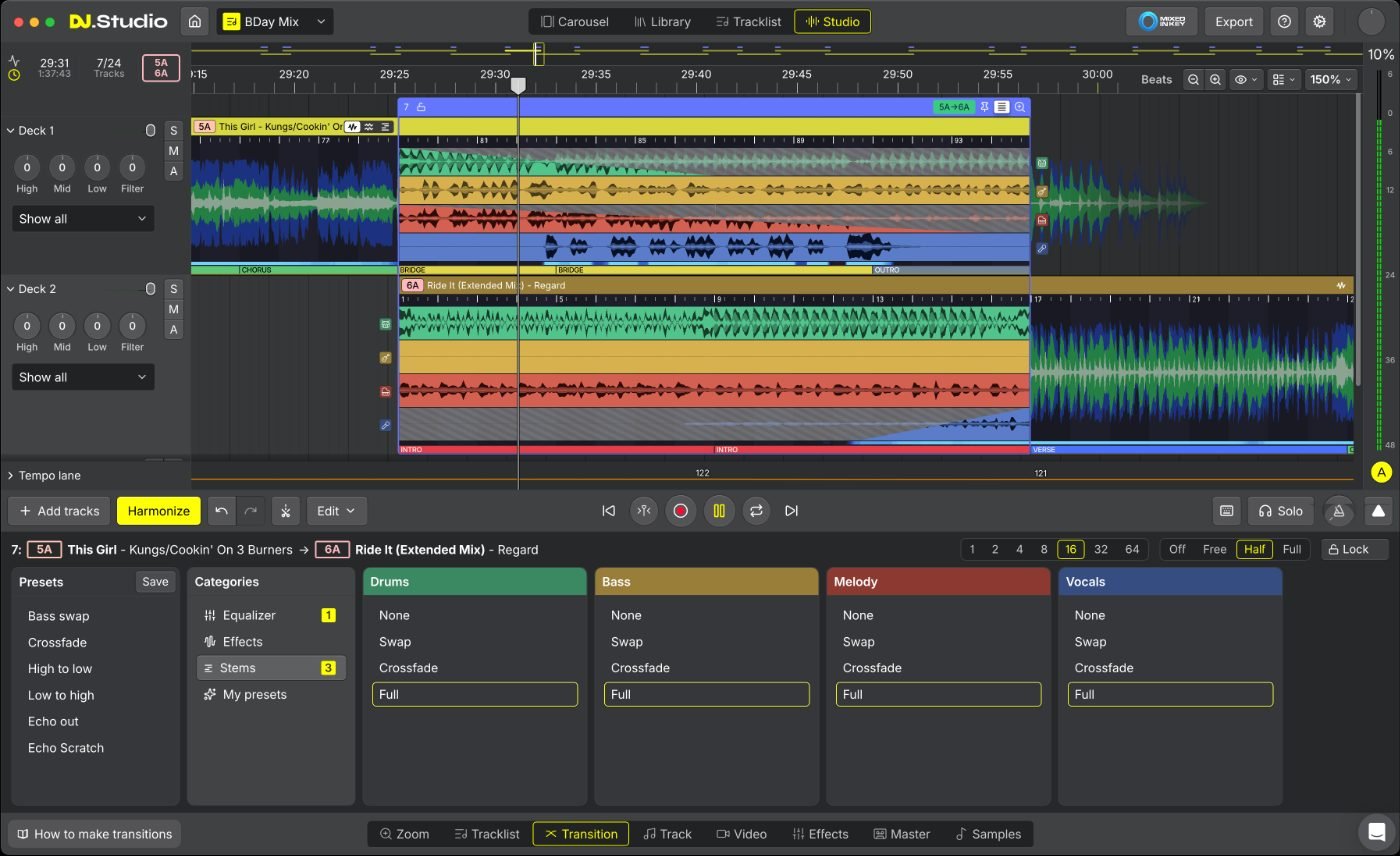
Yes, and it’s a proper game changer. Phrase detection was the most useful thing on this job. DJ.Studio 5.0 labels the sections in each track, such as the intro, verse, chorus, buildup, drop and outro, shows them under the waveform and snaps transitions to them. If it gets one wrong, you can edit, split, delete or retype it.
A phrase is a block of bars, often 8 or 16, that makes up one section of a song. Starting a transition at the top of a phrase is what makes a blend sound right even when the beats already line up. Doing that by ear across four hours of music is slow, and it’s where DJ.Studio saved the most time.
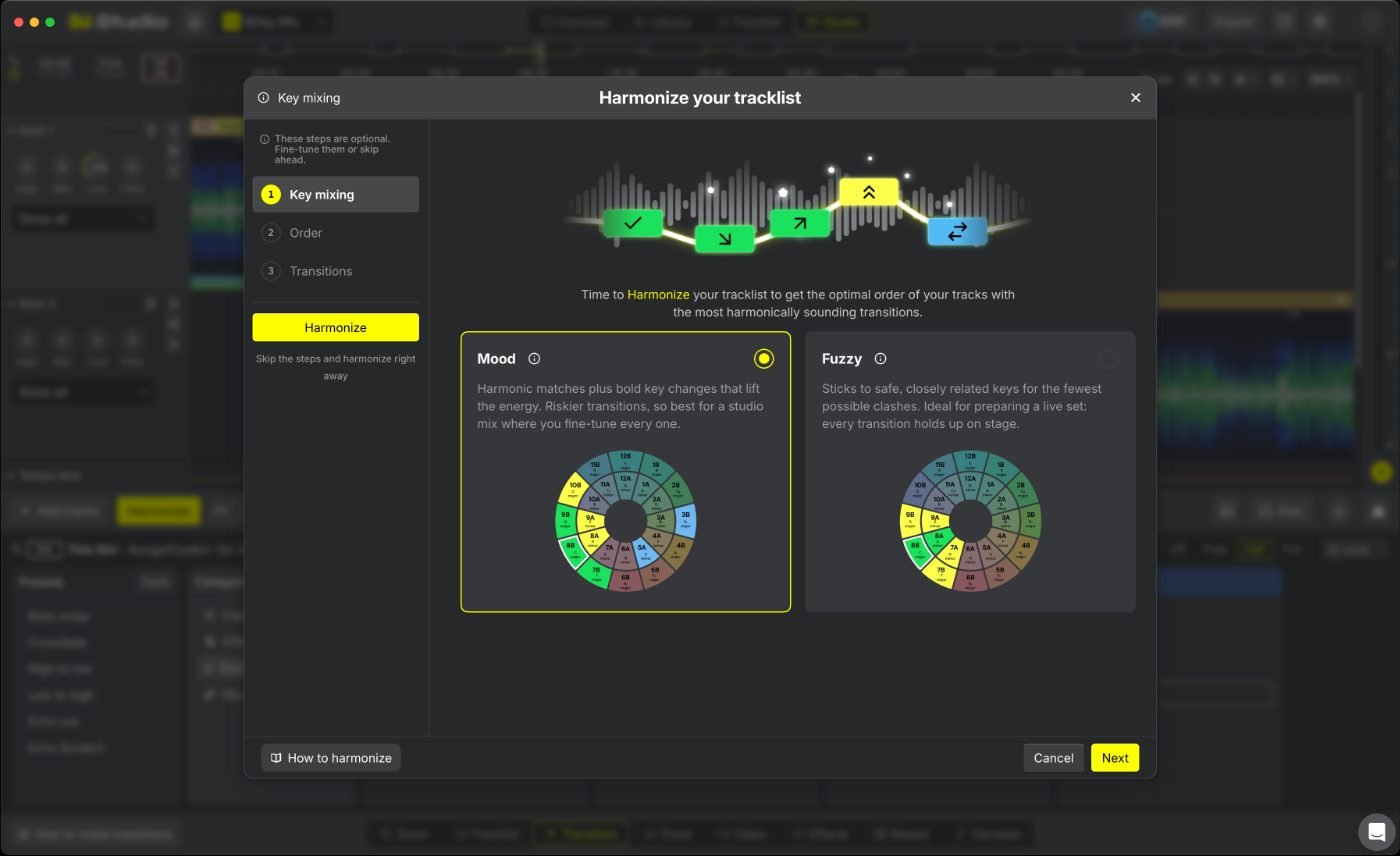
Harmonize, DJ.Studio’s auto-ordering tool, now uses the phrases too. It orders the tracklist by key and BPM and places transitions on intros and outros, with a choice of Mood or Fuzzy key mixing. Mood allows bolder key changes; Fuzzy sticks to closely related keys.
In my earlier DJ.Studio review I said Harmonize knew which tracks were compatible but not what a mix is for. Phrase-aware Harmonize closes a lot of that gap: it still orders by key and tempo, but now each blend lands where the song’s structure changes.
How accurate is the Smart Beatgrid?
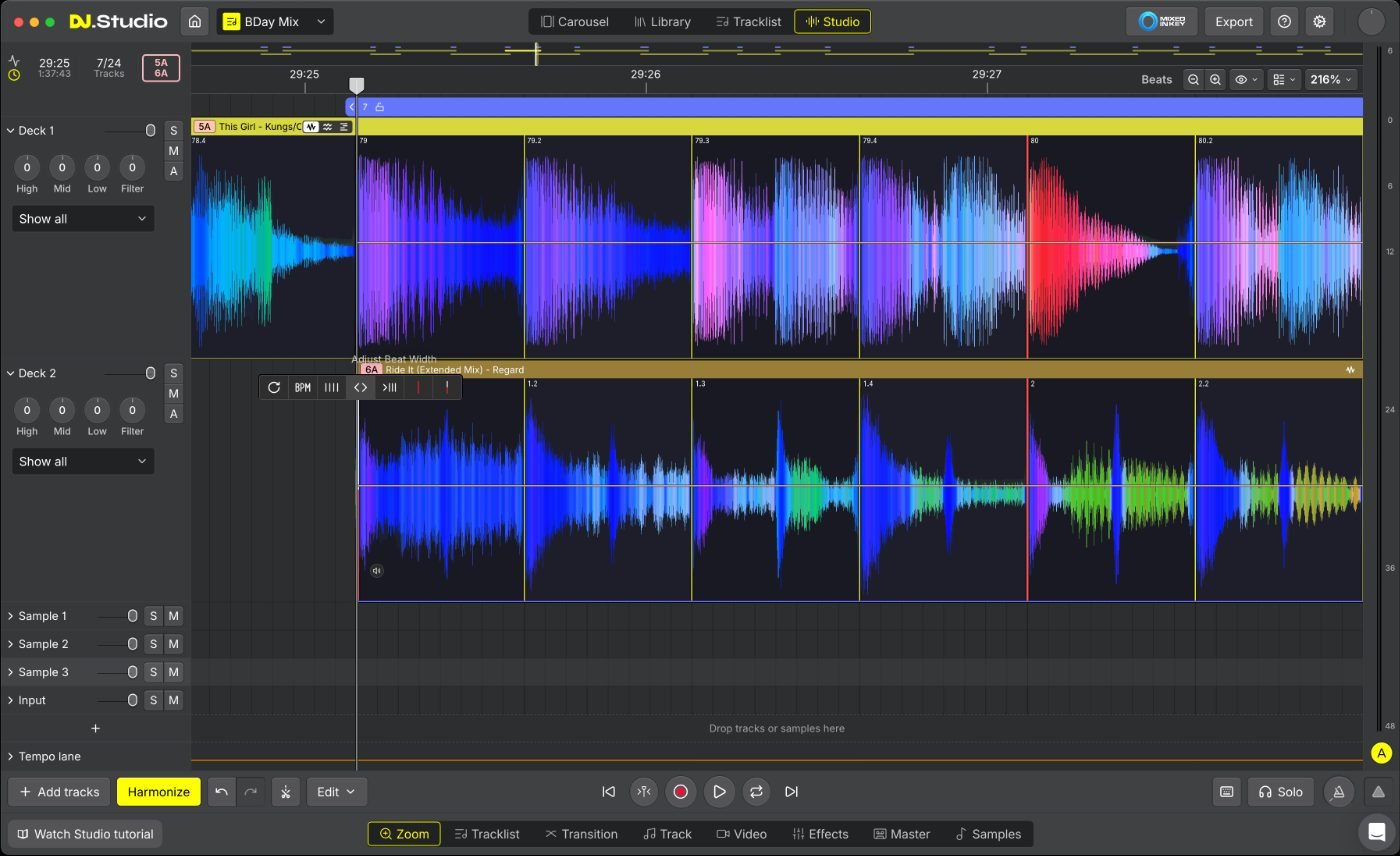
The Smart Beatgrid was spot on for this job. The new grid, now the default, finds the first beat more precisely, follows tempo drift and supports half- and double-tempo. That matters most on older records and anything played by live musicians, where the tempo moves around.
In Ableton, getting every track in time means warping it by hand, and on a four-hour job that adds up. Here the grids were right where I needed them.
Is there anything I’d change?
Only one thing. The playhead can run slightly out of time with the audio you’re hearing, so when you place a cut or a fade by ear, the line on screen isn’t quite where the sound is. It didn’t slow the job down much, but it meant checking close edits twice.
Worth checking
There may well be a latency setting I didn’t find. If you notice the same thing, try a different output device in DJ.Studio’s audio settings first.
How good are DJ.Studio’s stems?
DJ.Studio’s stems are pretty good and definitely good enough for a DJ mix. Solo a stem and you’ll hear a little bleed and a slightly thin top end, but inside a full mix, with other tracks playing, none of that got in the way.
DJ.Studio splits each track into four stems on timeline lanes, and each transition can swap, crossfade or keep each stem. Ableton has its own stem separation now too, in Live 12.3 Suite, but I stuck with DJ.Studio’s on this job. For how the live DJ apps handle stems, see DJ stems compared.
Does it sound as good as Ableton?
Very close. To my ears Ableton still has a slight edge, but you’d struggle to notice it in a background mix, and for most mixes going to Mixcloud or a client it won’t matter. I rendered the finals from Ableton because I was mastering there anyway.
Version 5.0 runs on a new audio engine written in C++, uses less CPU and memory, and exports up to three times faster than version 4: a 60-minute mix in under three minutes.
08 · MASTERINGWhy did I master in Ableton?
Mastering in Ableton is simply how I work, and DJ.Studio fits around that. The Master tab has a gain and compressor control on each track, a VST slot, a limiter with gain-in and ceiling controls and an on/off switch, a frequency analyser and peak and RMS meters. There’s no EQ across the whole mix, so I switched the limiter off and did the final EQ and limiting in Ableton.
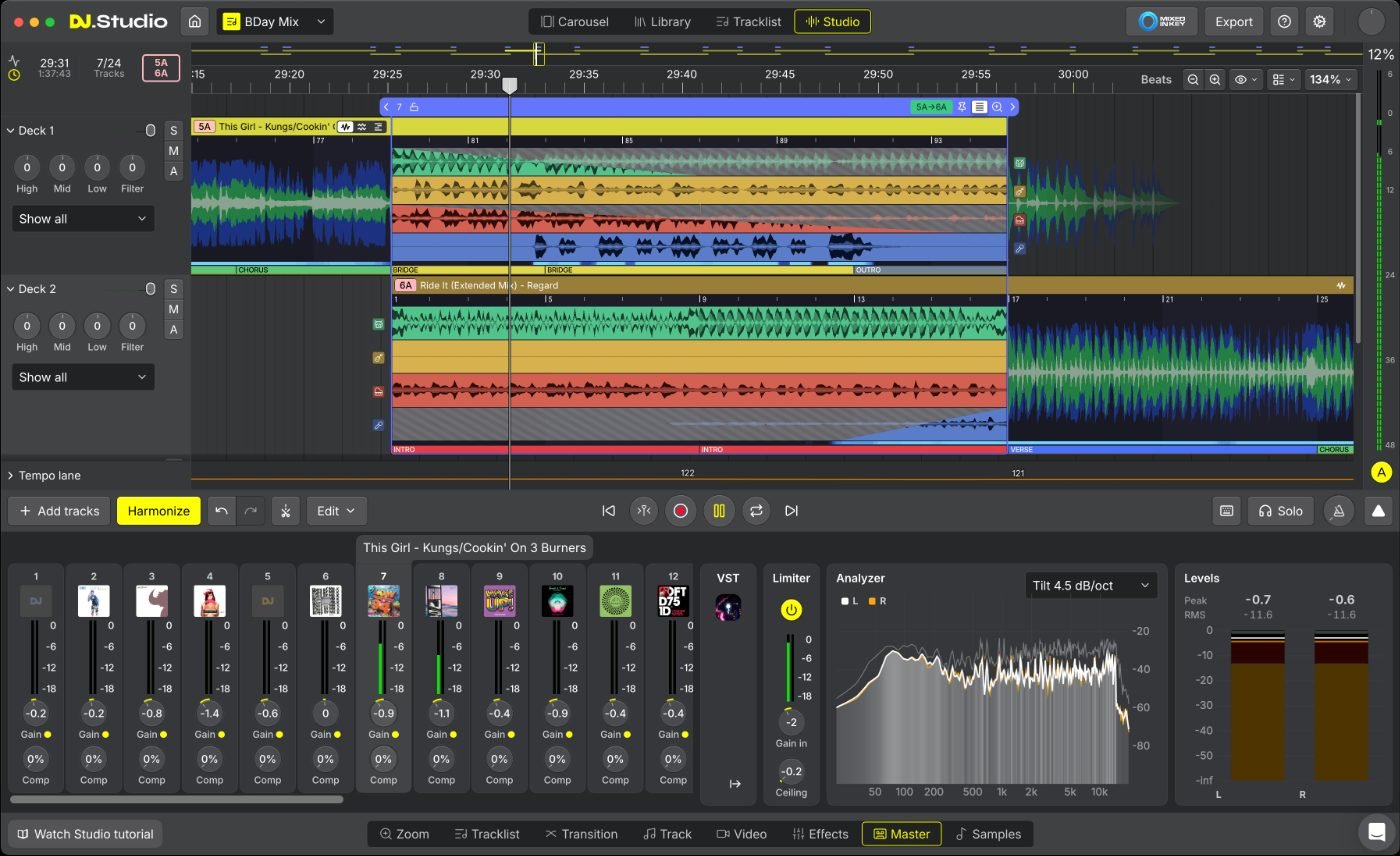
If you’d rather finish inside DJ.Studio, the VST slot takes third-party VST3 and AU effects, so you can load your own EQ and limiter. VST support comes with the Ultimate plan. I already had Ableton, so exporting was the quicker route. Our guide to mastering a DJ mix in Ableton Live covers the chain I use.
09 · EXPORTHow do you get the mix into Ableton?
You get a DJ.Studio mix into Ableton Live from the Export menu, in one of two ways: render the mix as audio and drop it into Ableton, or export the whole project as an Ableton Live set. Exporting isn’t available during the 7-day free trial.
- Audio: MP3 at 320 kbps, WAV or FLAC, with an auto gain switch and an option to split the mix into separate files. Which formats you get depends on your plan (see the table below).
- Ableton Live project: an .als set with each track on its own channel (vertical layout) or alternating across two channels (horizontal). Volume, EQ and effect automation come across, so an automated EQ becomes an EQ plugin on the Live channel with the same moves.
- Stems for Ableton: a separate export that sends a track’s stems to Live already warped to its beatgrid, and in 5.0 it can add a separate instrumental.
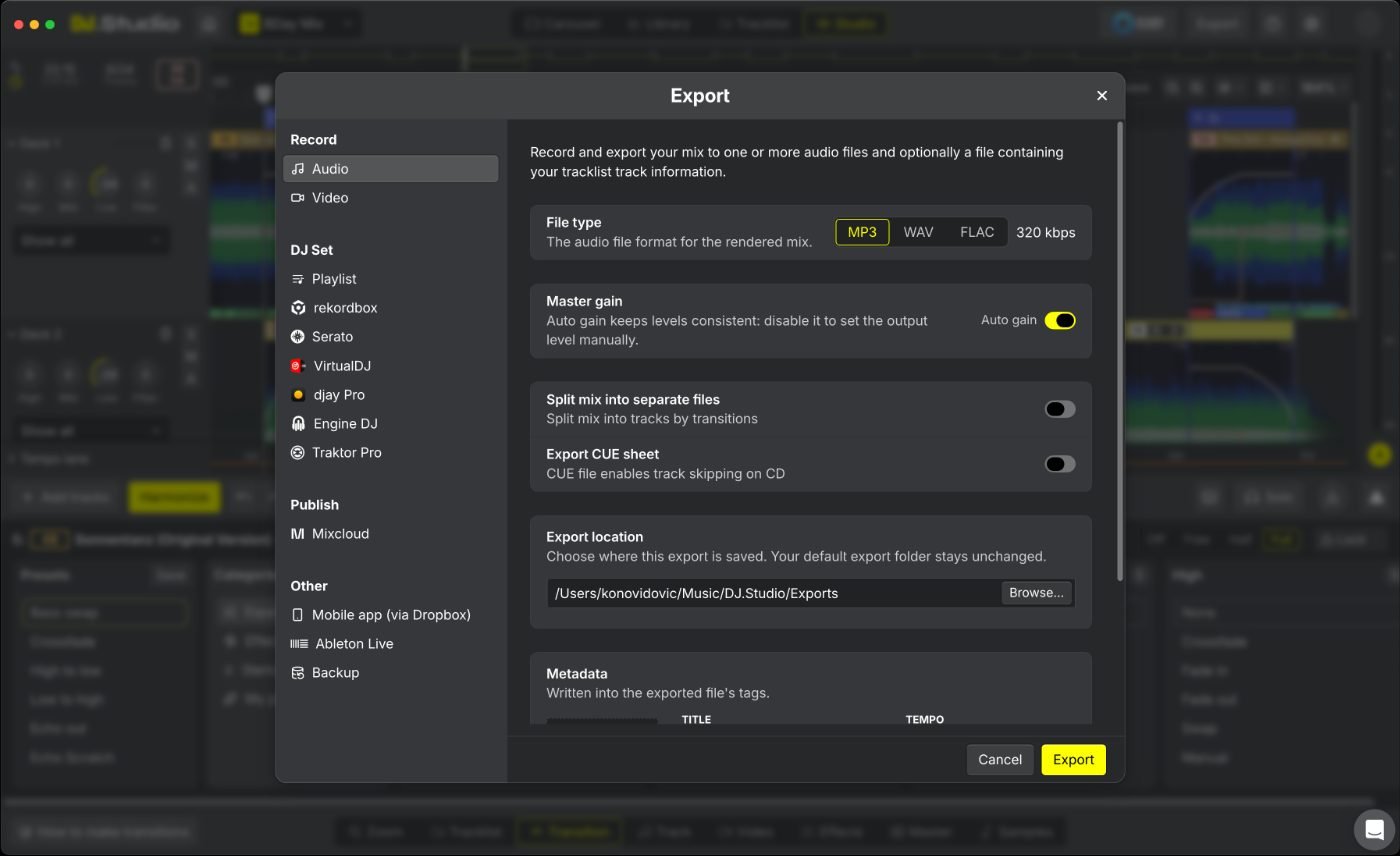
One tip from the job: a full project export gets big once stems are in it, so leave some disk space free for four hours of material.
Which plan do you need?
For this workflow, Pro + Stems is the lowest DJ.Studio plan that covers it, because it includes both stem separation and Ableton Live export. Ultimate adds VST plugins, video export and 24- and 32-bit audio, which you only need if you want to master inside DJ.Studio or make video mixes.
One-time licences cost $99 to $209, or $29 a month for Pro + Stems, in US dollars before tax. A one-time licence covers two computers and includes 12 months of updates and support; after that, the Update Package is $49 a year if you want new features.
| Feature | Studio | Pro | Pro + Stems | Ultimate |
|---|---|---|---|---|
| Audio export formats | MP3 | MP3, WAV 16-bit | MP3, WAV 16-bit, FLAC 16-bit | MP3, WAV 24/32-bit, FLAC 24-bit |
| Ableton Live export | No | Yes | Yes | Yes |
| Stem separation | No | No | Yes | Yes |
| FX Pack (30+ effects) | No | No | Yes | Yes |
| VST3 and AU plugins | No | No | No | Yes |
| Video export | No | No | No | Yes |
| Covers this job’s workflow? | No | No stems | Yes | Yes, plus in-app mastering with your own plugins |
Plans and prices checked November 2026.
If you want to try the workflow, DJ.Studio offers a 7-day free trial with no card needed, and the trial doesn’t turn into a subscription by itself. When you buy, use the code below for 10% off.
Code at checkout: mixtape10 (10% off)
Which app did what on this job?
On this job DJ.Studio did everything up to the mix-down, and Ableton did the finish. Here’s the split, stage by stage.
| Stage | App I used | Why |
|---|---|---|
| Track order by key and tempo | DJ.Studio 5.0 | Grouped tracks into key- and tempo-matched chunks I could move between quickly |
| Transition points | DJ.Studio 5.0 | Phrase detection put each blend at the top of a section |
| Beatgrids | DJ.Studio 5.0 | Smart Beatgrid was spot on for this set |
| Stems | DJ.Studio 5.0 | Sounded good inside the mix |
| Fine edits by ear | DJ.Studio 5.0 | Worked well; I double-checked close edits because of the playhead |
| Master EQ, compression, limiting | Ableton Live | My usual mastering chain lives there |
| Final render | Ableton Live | Rendered from the master session |
Who should skip DJ.Studio 5?
DJ.Studio 5 is a preparation and export tool, so skip it if your work is mainly live sets. It also won’t suit every studio user.
- You only DJ live and never pre-record mixes. Your performance software already covers you.
- You want to master inside one app and don’t want to pay for Ultimate plus your own VST plugins.
- You need studio-grade stems for a remix or a release rather than a DJ mix.
- You want to try exporting before you pay. The free trial doesn’t include export.
DJ.Studio 5 review FAQ
Can DJ.Studio 5 replace Ableton for making DJ mixes?
For building the mix, largely yes. On a paid job I used DJ.Studio 5.0 for track order, transitions, beatgrids and stems, then finished the master in Ableton, which is where my mastering chain lives.
What if the DJ.Studio playhead looks out of time with the audio?
I noticed this on close edits. Try a different output device in DJ.Studio’s settings first, and if it persists, DJ.Studio’s support team can help.
Can you turn off the master limiter in DJ.Studio?
Yes. The limiter in the Master tab has an on/off switch, plus gain-in and ceiling controls. I switched it off and did the limiting in Ableton.
How good is DJ.Studio’s stem separation?
Pretty good, and definitely good enough for a DJ mix. Soloed, you’ll hear a little bleed, but in the finished mixes they sounded right.
How much does DJ.Studio 5 cost?
One-time licences run from $99 to $209, or $29 a month for Pro + Stems, before tax. Existing users with an active update package get 5.0 free.
Can you export from the DJ.Studio free trial?
No. The 7-day trial lets you build a mix, but exporting needs a paid licence.
Verdict: DJ.Studio 5 earns a place in my workflow
- Buy it if: you build pre-recorded mixes, radio shows or background music and want the prep done faster. Phrase detection is the reason to upgrade.
- Pair it with a DAW if: you already master in one. The Ableton export makes the handover quick.
- Choose Pro + Stems: for stems plus Ableton export. Go Ultimate only if you want VST plugins, video or 24-bit audio.
- Small niggle: double-check close edits, as the playhead can drift slightly from the audio.
- Skip it if: you only DJ live, or you need release-grade stems.
I’ll keep using DJ.Studio for the early stages of every mix from now on, and keep Ableton for the finish.
10% off with code mixtape10
Want the full picture before you buy? Our DJ.Studio review covers the app beyond version 5.0.
How we research: this review is based on my own use of DJ.Studio 5.0 on paid client work (four pre-recorded mixes), using an early release DJ.Studio sent me. Plans and prices were checked in November 2026. Screenshots courtesy of DJ.Studio; diagrams are our own. The DJ Mixtape earns a commission if you buy through our DJ.Studio links. By Dan, DJing since 1994.